
Descrição


Turn your WordPress Blog into a PDF-Catalog
We assume you are a story teller or have created many articles. What if you could generate a PDF of all your stories, that your readers could read offline or print out on the fly? Well with this plugin they can – or you can if you limit the access.
PDF Catalog Demos
This Demos have been created using only the plugin. No manual work!
- No Category / Post Layout 7
- Category Layout 3 / Post Layout 1
- Category Layout 3 / Post Layout 2
- Category Layout 3 / Post Layout 3
- Category Layout 3 / Post Layout 4
- Category Layout 3 / Post Layout 5
- Category Layout 3 / Post Layout 6
WP Post PDF Features
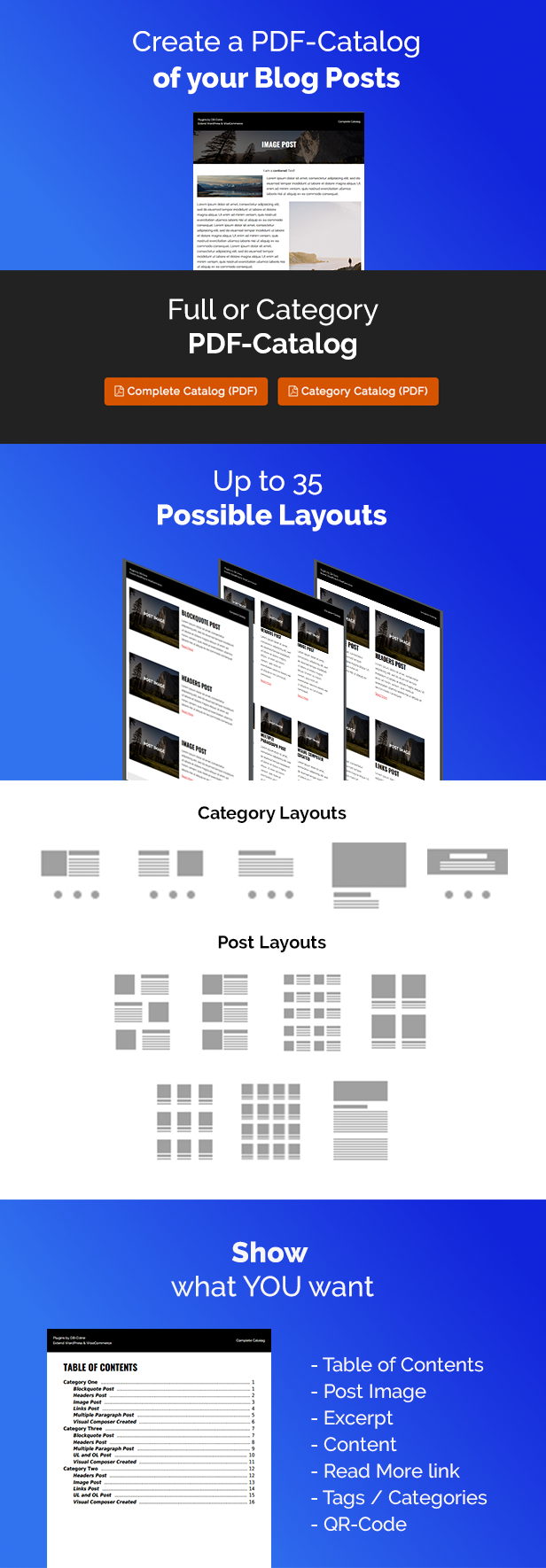
- More than 30 possible layouts
- 5 Category Layouts
- 7 Posts Layouts
- Full PDF Catalog of all your Posts
- Category PDF Catalog only of current Category
- Add a Table of Contents for every Post
- Add a QR-Code of your Posts
- Add extra texts before OR after your Posts
- Add some special advanced settings
- Show Subcategories
- Exclude parent Posts when showing subcategories
- Choose a container Padding
- Choose a position of the Links
- Create a custom header (1/2 or 1/2 + 1/2 or 1/3 + 1/3 + 1/3)
- Create a custom footer (1/2 or 1/2 + 1/2 or 1/3 + 1/3 + 1/3)
- Add background color
- Choose Custom Fonts
- Choose text size
- Choose line height
- Choose text alignment
- Choose image size
- Choose vertical aligment
- Show or Hide Elements (Image, Title, Excerpt, Description, Categories, Tags, QR-Code)
- Shortcode-Support [wp_pdf_catalog text=”text” category=”full OR Category-ID”]
- Page numbers
- Well Documentented
Tested
- Tested with WordPress 3.8+
Compatibility
- WordPress 3.8.1+
- PHP 5.6+
- Multilingual Support
Changelog
======
1.0.8
=====
- NEW: Better support for custom post types
taxonomies will now be set automatically when argument missing
Example: https://demos.welaunch.io/wordpress-pdf-catalog/?wp-pdf-catalog=52&wp-pdf-catalog-post-type=featured_item
- NEW: Added option to show post date
- FIX: Issue with alignment
- FIX: Post type not showing
======
1.0.7
=====
- NEW: Option to limit max posts count
- NEW: Dropped Redux Framework support and added our own framework
Read more here: https://www.welaunch.io/en/2021/01/switching-from-redux-to-our-own-framework
This ensure auto updates & removes all gutenberg stuff
You can delete Redux (if not used somewhere else) afterwards
https://www.welaunch.io/updates/welaunch-framework.zip
======
1.0.6
=====
- NEW: Added an option for MPDF debug mode in advanced settings
- FIX: Shortcode fallback to post type
======
1.0.5
=====
- NEW: Support for custom post types
Use shortcode without any paramters:
[wordpress_pdf_catalog]
Or with:
[wordpress_pdf_catalog category="MY_TERM_ID" taxonomy="MY_CUSTOM_TAXONOMY" text="Download Posts as PDF"]
Example: https://demos.welaunch.io/wordpress-pdf-catalog/staff-category/staff/?wp-pdf-catalog=51&wp-pdf-catalog-post-type=&wp-pdf-catalog-taxonomy=staff_category
- NEW: Option to hide category descripption
- NEW: Default shortcode category is no longer "full"
======
1.0.4
=====
- NEW: 8th Template (title no in image)
- FIX: PHP notices
- FIX: Buttons showed in backend (not working)
======
1.0.3
======
- NEW: MPDF upgrade to V8
- NEW: PHP 7.4 Support
======
1.0.2
======
- NEW: Split Chunks Option in advanced settings
- FIX: Shortcode generated wrong URL
- FIX: Countable notice
======
1.0.1
======
!!!!!!!!!!!!!!!!!!!!!!!!!!!!!!!!!!!!!!!!!!!!!!!!!!!!!!!!
!!!! MPDF 7 requires at least PHP 5.6 !!!!
!!!! Do NOT update if you are on a lower Version !!!!
!!!!!!!!!!!!!!!!!!!!!!!!!!!!!!!!!!!!!!!!!!!!!!!!!!!!!!!!
- NEW: PHP 7.2. Support
- NEW: Moved MPDF to vendor folder for composer support
- NEW: Option to enable MPDF Debugging (images, fonts)
- FIX: Upgraded MPDF Rendering Engine to Version 7.0.3
======
1.0.0
======
- Inital release
# Future features
=====
- None